All Posts in user interface

May 23, 2015 - Comments Off on Heuristic Evaluation

Heuristic Evaluation

Word: Heuristic Evaluation

Definition: A method used to inspect and evaluate the usability of software in order to understand product effectiveness, identify interface design problems, and explore interactions and patterns.

Thoughts: Heuristics is typically conducted during the research phase of the user experience process. During this evaluation, a UX designer will examine all aspects of the product's UI while taking considerable note of important user flows. These do not always have to be formal and can provide a great overview of current product best practices and flaws.

Now, like many UX methodologies, the way in which these evaluations are conducted can differ from one practitioner to the next. Some researchers (myself included) prefer to keep heuristics focused on single products at a time with very detailed analysis. Others like an overview approach where they evaluate many products and focuses on a few specific areas to investigate in depth that can be compared and contrasted.

Any way you slice it, this is a great tool to not only understand the product you are working to improve but to also provide helpful insights into competing products as well.

Question: What is your preferred heuristic practice? Why?
May 17, 2015 - Comments Off on Graphical User Interface

Graphical User Interface

Word: Graphical User Interface (GUI)

Definition: GUIs refer to the interface between the user and the computer system that allows users to interact with an electronic device through graphical icons and visual indicators. Graphical user interfaces allow users to make choices through clicking buttons and graphics. It is sometimes referred to colloquially as a "gooey".

Reference: GUIs are best known through their early implementation at Apple and Microsoft in which they replaced the arcane and difficult to use textual interfaces of early computing. The graphical user interface became the standard over time because it made computing much more intuitive, easier to learn, and extremely accessible.

Thoughts: The work of the UX designer ultimately effects the resulting product's GUI. After computing made the shift to graphical user interfaces our field emerged from the trenches and it's up to us to make this layer between the user and the computer seamless. UX design is the Emerald City; Pay no attention to the man behind the curtain.

May 3, 2015 - Comments Off on Inline Validation

Inline Validation

Word: Inline validation

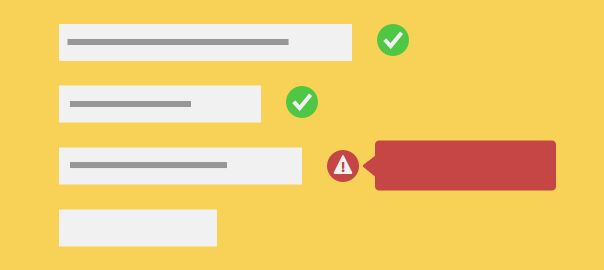
Definition: The inspection and validation of entered data, typically within a form field, before the user hits the call-to-action button.

Thoughts: When forms are validated in real-time, it allows users to complete them more quickly, with less effort, and with fewer errors. The combination of these three things results in greater overall user satisfaction.

We've all been there! That time when you fill out a long form only to his "submit" and realize you committed an error. But now you are back at the top of the page and must become Indiana Jones to find out where the egregious error is lurking. By the time you eventually find it and resubmit you have most likely committed another error. This time perhaps, the form removed your credit card information after the initial submit and you did not realize this when you went for the second go-around. An aggravated email to the help desk ensues.

Now you think to yourself, if only this form had inline validation and I knew exactly when and where I committed that error in the first place!

Note: I may be overly hostile about this at the current moment because of some personal trouble on the Delta Airlines website as of late... just saying.

Question: Why would a designer choose not to use inline validation within a form web?

April 14, 2015 - Comments Off on Pogo Sticking

Pogo Sticking

Word: Pogo Sticking

Definition: A user navigates to a page deeper in a site's hierarchy, only to immediately navigate back to the page in which she came from -- typically happening multiple times in a row.

Thoughts: Pogo sticking tends to occur because of usability problems like misleading links or omitted information. This increased interaction, providing no value to the user, can be extremely costly to a site and can result in decreased engagement over time.  This is different from a "bounce rate" because it happens within the site itself. This behavior pattern likely demonstrates that users are having difficulty finding the content they are looking for.

Question: Can you think of a time that it may be useful to have users bounce back and forth from page to page or should such patterns simply be avoided?


April 7, 2015 - Comments Off on Change Blindness

Change Blindness

Word: Change Blindness

Definition: A perceptual phenomenon in which an observer does not notice the introduction of visual changes to an existing image.

Reference: Think about the games you played as a kid that flashed the same image twice but the second time something was different and you had to figure out what that was. This is surprisingly difficult! It is difficult because there is an interruption in our visual perception and because of the speed in which this happens, our eyes have a difficult time fixating on those changes and interpreting them.

Thoughts: Now think about a time you submitted a form only to see an error message. Then you have to identify which form field the error occurred in. Why is it so hard to find the form field with the small red "x" next to it? Change blindness, that's why! The subtle change between the form pages is not enough to easily identify the problem and therefore we become a frustrated user as we search for the erred field. This is just one of many examples of how change blindness can effect user experience. It is important to think about this while designing subtle interactions.

February 18, 2015 - Comments Off on Fat Footer

Fat Footer

Word: Fat footer

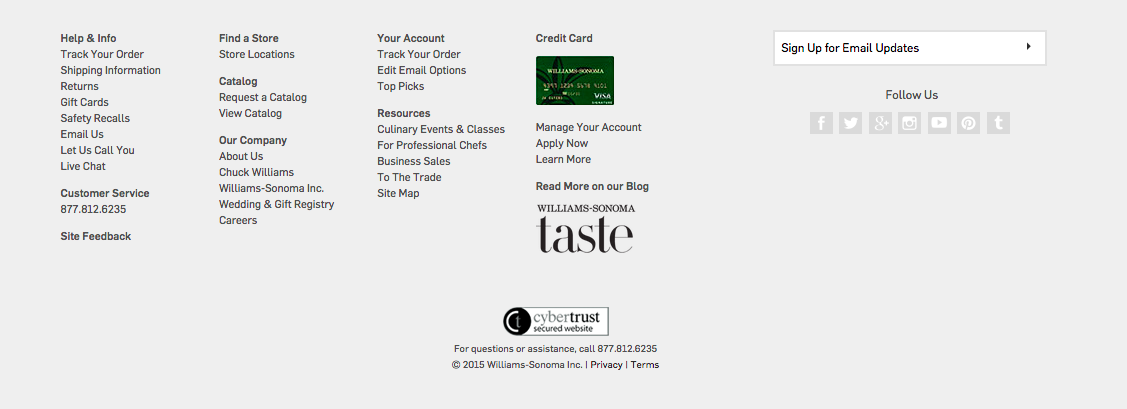
Definition: A form of secondary navigation located at the bottom of the page, typically taking up a considerable amount of page real-estate and serving as a shortcut to hierarchical content.


Screen Shot 2015-02-18 at 9.24.37 PM

Williams-Sonoma fat footer


Thoughts: Fat footers are typically used on sites with an incredible amount of information and lengthier page content. These sections are extremely helpful to link popular site content that may not be directly relevant to the selected page itself. It also acts as a visual anchor and an affordance that a page has come to an end while providing additional page view opportunities. Fat footers also present space for graphics, social media links, and newsletter promotions. These big guys have graduated from more than just links lists.

While I know this may come off as a broken record to you consistent "UX 365" readers, but there is a debate on this topic amongst us! While there are clear benefits to such "obese footers" (as Jakob Nielsen once called them), there are also thoughts of too many links and a persistent feeling of "spamminess".

Both points are well taken and I venture to guess that like with most polarizing topics, it comes down to a case by case basis with specific business goals in mind.

Question: How does the persistence of continuous scroll effect the future of the footer, regardless of its size?

February 5, 2015 - 1 comment.

Information Architecture

Word: Information Architecture

Definition: "The art and science of organizing and labeling web sites, intranets, online communities and software to support usability and findability." - As defined by the Information Architecture Institute

Reference: Information architecture is performed by a variety of practitioners from specialized information architects themselves to more general UX researchers or even more broadly yet, UX/UI designers. However, and quite obviously, the disciplinary practice pulls from a variety of other subjects including library science, cognitive psychology, semiotics, cybernetics, discrete mathematics, and yes, even architecture. Information organization is not something that a UX designer should take lightly. Findability is an incredible component of what makes user experience so credible and invaluable to products, companies, and especially users.

Question:  It is easy to see how an information architect is extremely important when organizing a site with a plethora of information (think of the nightmare it was to do Amazon's IA). Is there ever a point when a site is too small for IA or IA does not need to be considered?

February 3, 2015 - Comments Off on Eye Tracking

Eye Tracking

Word: Eye Tracking

Definition: A usability testing technology that records and tracks what users are looking at and focusing on when skimming interfaces.

Thought: Eye tracking generates a variety of metrics that are extremely useful to researchers. These metrics include gaze plots, time taken for users to locate target areas, fixation points, and heat map visualizations. While such research methods require expensive equipment and considerable time investment, they provides insight into exactly what people are looking at. It is extremely difficult for someone to tell you precisely where her gaze is focused and what she sees. Eye tracking is a very accurate way to fully understand a user's exact visual focus and attention on a page. This method is most effective when combined with other research techniques and approached from both a qualitative and quantitate perspective. Keep and eye out for the opportunity to try this technique (pun intended).

Check out the F-pattern post for more on how users skim and understand interfaces.

Question: What sorts of interfaces do you think work best for eye tracking? On the other hand, what types of interfaces might eye tracking not be the most useful tool?

January 23, 2015 - Comments Off on The Fold

The Fold

Word:  The Fold

Definition: A theoretical line, below which content on a website or application is not visible without scrolling.

Reference: The fold is a term borrowed from print, back when it truly referred to the literal fold in the center of a newspaper page. Newspaper editors wanted to make sure that their most eye-catching and important headlines appeared "above the fold" so that the content was visible when papers were stacked for display and purchase.

The digital equivalent is content that appears when a web page loads. The content that fits the screen before scrolling is said to be "above the fold".

Here's the debate, because let's face it, there is always a debate - many say that "the fold" is no longer a relevant way to view and layout content in an era when scrolling has become a norm and a reflex. Design studio, Huge Inc, did a wonderful UX research investigation on just this and it is definitely worth checking out. In their study, Huge found that nearly everyone scrolled past the fold but it was various affordances that determined how far down the page the user explored.

Thoughts/Questions: Your turn! As we talk today, in 2015, is "the fold" still a relevant way of thinking about UX design?

January 21, 2015 - Comments Off on Search Dominant Users

Search Dominant Users

Word:  Search-Dominant Users

Definition: The tendency of a user to go straight for the search bar when first entering a site looking for content.

Reference: Jakob Nielsen sheds light on search-dominant users in his 1999 book, Designing Web Usability and notes, that over half of users exhibited "search-dominant" tendencies. However, Nielsen's assertion was later tested in later research studies including Jared Spool's study in which he found no "search-dominant" users, and instead, found only "search-dominant" sites.

Thoughts and Questions: While a debate still remains, it is important to understand the power of search and take careful consideration when designing a user interface. Whether the user is search-dominant or you created a site that promotes search-dominant behavior, you better believe that users will be searching for that search!