All Posts in user interface

January 20, 2015 - Comments Off on Secondary Navigation

Secondary Navigation

Word: Secondary Navigation

Definition: Directing links on a website or application that represents information that is of secondary interest to the user.

Thoughts: Great examples of secondary navigation are pages that sites feel obligated to offer such as "FAQ" and "About Us". This is not to downplay the importance of such links, which are helpful in their moments, but for the most part, a user has not arrived on your site just to read your "About Us" section. Larger websites like your Home Depots or your Amazons need these tiered navigational schema because of the plethora of  navigational choices. Regardless of site size, tread lightly and choose your navigations thoughtfully and purposefully.

Question: If secondary information is so secondary, does it even belong at the top of the page (the typical location)? Is the footer more appropriate? If the footer, is it still considered secondary navigation?

January 19, 2015 - Comments Off on Primary Navigation

Primary Navigation

Word: Primary Navigation

Definition: Directing links on a website or application that (most typically) appear above the fold,  are displayed near the top of the page, and represents the content that is most relevant to the user.

Thoughts: Primary navigation can usually be found just below the logo and header and is always displayed prominently. Navigation is key to way-finding and acts as a constant and comforting presence to orient the user.

Question: Is primary navigation a left-over relic of interets-past? What will be the role of primary navigation on our infinite and parallax scrolling future?

January 18, 2015 - Comments Off on Breadcrumbs

Breadcrumbs

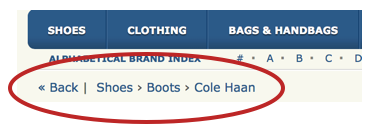
Definition: A type of secondary navigation used for way-finding in order to reveal the user's location within a website or application. Breadcrumbs prove to be especially helpful when landing on a page out of context or not arriving initially through a homepage.Screen Shot 2015-01-17 at 11.47.21 PM

Thought: Breadcrumbs are seen and used most often on large websites full of copious amounts of information, like e-commerce sites. However, it seems that the trend for breadcrumbs may be fading fast and the pattern is not as strong or significant as it was, say, three years ago.

It is important to keep an eye out for such trends because, like in any other constantly and evolving field, patterns go in and out of style. I mentioned it here because it is an important term to know and understand when discussing way-finding and navigational context even if the pattern may not be as widely used.

Question: What do you think; are breadcrumbs still an impactful and/or a relevant UI pattern?

January 11, 2015 - Comments Off on Skeuomorphic Design

Skeuomorphic Design

Word:  Skeuomorphic Design

Definition: The design style in which old and familiar ideas are incorporated into new technologies even if the familiar no longer plays a functional role. In other words, the digital is made to look like the the old (in this case, the physical world) it represents.

Reference: Think of the early Apple iOS design in which the "Notepad" app physically looked like a ruler-lined notebook. Or my personal favorite, the first Southwest Airlines site that was designed to look and function just like the real world ticket counter. (Oh, how far we have come in the world of airline websites!)

Thoughts/Questions: We have long moved passed the "amateur" skeuomorphism of internets past and into a world full of flat and material design. Like fashion, will we ever see the day when skeuomorphism is so old, it's new again?

January 8, 2015 - Comments Off on Call To Action

Call To Action

Word:  Call To Action

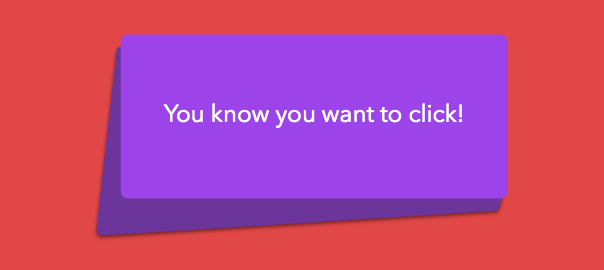
Definition: An interface element (usually in the form of a button, link, etc) that aims to prompt or encourage a user to perform a particular activity

Thought: The Call To Action should be displayed prominently to guide the user, focus the site, and measure success. Word of warning, less is more! Don't render your perfectly crafted Call To Action useless by offering too many actionable options. Be precise and determined in your placement. You should not take this topic lightly; take action instead!

Question: Is there ever a time when a homepage can work successfully without an obvious actionable call?